
TWS pairing usually means the initial process in which a phone and true wireless earbuds exchange the information needed to connect and establish a Bluetooth relationship. After pairing, the devices can save this information for future connections. TWS describes the true wireless stereo earbud design; pairing describes how it establishes a relationship with another device.
A phone remembering a pair of earbuds is therefore different from the earbuds being connected to it right now. Understanding this distinction explains why the device name can remain in the Bluetooth list while showing “Not connected,” and why you usually do not need to start pairing from scratch the next time you take out the earbuds.
What Do the Phone and Earbuds Exchange During Pairing?
When you first use the earbuds, the phone does not yet have a pairing record for them. Once the earbuds enter pairing mode, the phone can discover them. Selecting the correct device on the phone and following its prompts allows the two devices to establish a pairing relationship.
This process does more than add an earbud name to a list. Pairing establishes security keys to protect communication. Saving security information for future use is technically called “bonding.” In everyday earbud use, the information retained after initial pairing lets the phone and earbuds use their existing relationship to connect again.
Turning the earbuds on and entering pairing mode are also different. After switching on, the earbuds may be trying to connect to a phone they have used before. To pair them with a new phone, you also need to put them into pairing mode as instructed for that model. Opening the case, taking out the earbuds, using a case button, or operating the earbud controls are all methods a particular model might use. One action does not apply to every model.
Why Are the Earbuds Paired but Not Connected?
“Paired” means the phone has saved information about its relationship with the earbuds. “Connected” means the two devices currently have a communication link. When the current connection ends, the pairing record can remain.
For example, when the earbuds are switched off, the phone cannot communicate with them for the moment, but their name can remain in its saved-device list. After the earbuds are switched on again, models that support automatic reconnection can use the existing record to connect again, provided conditions such as Bluetooth being enabled on the phone and the devices being within connection range are met. This is reconnection; it does not require repeating the initial pairing process.
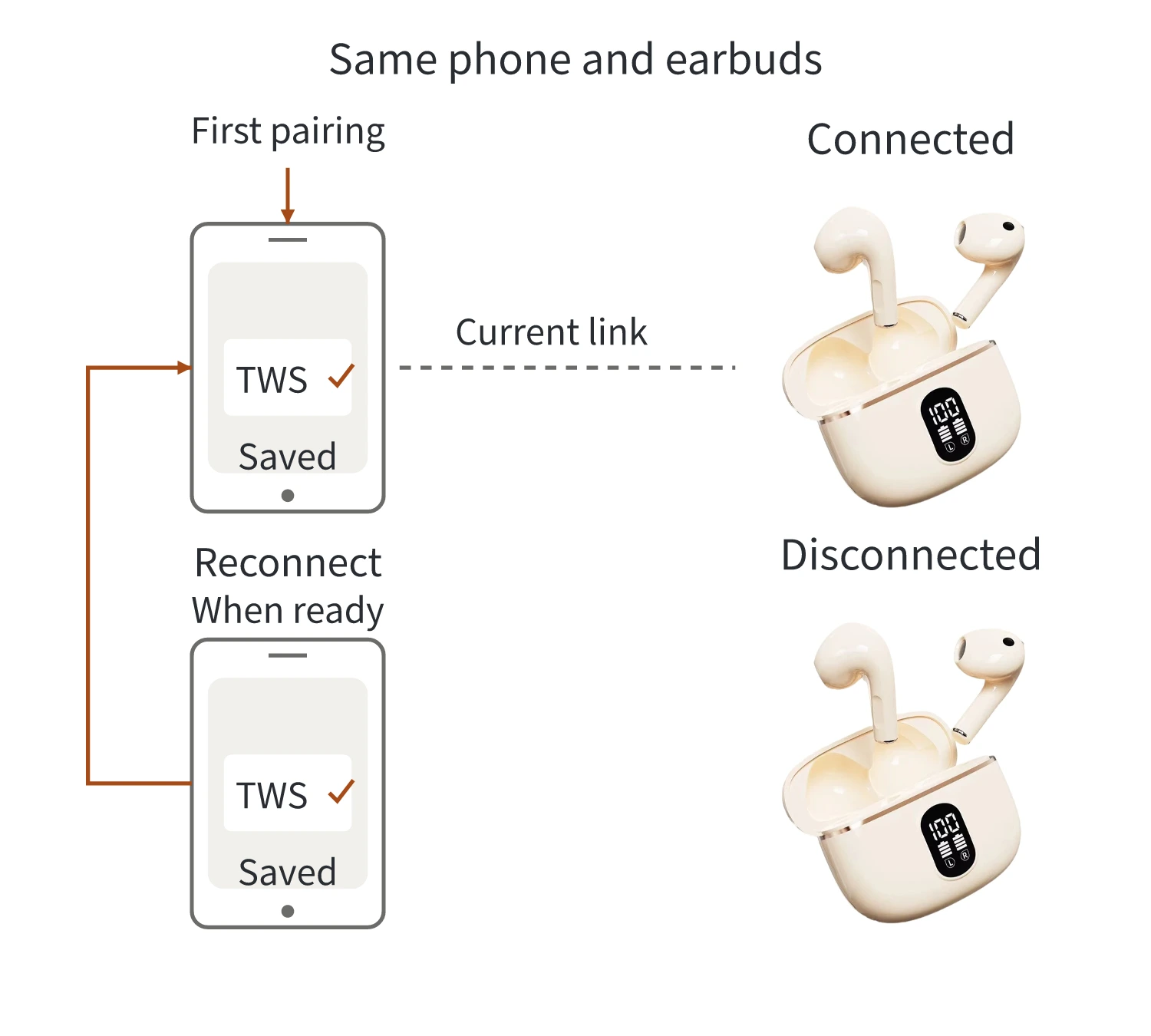
The earbuds shown are Yinshidon’s X87; the connection states are a general illustration.
The diagram shows the pairing record remaining in place while the current connection changes. Whether automatic reconnection succeeds also depends on power, the Bluetooth setting, distance, existing connections to other devices, and the model’s connection behavior. Opening the case does not necessarily mean the earbuds will connect to this phone.
If the phone already shows “Connected” but music still plays through its speaker, that alone does not mean pairing has failed. Check whether the earbuds are selected as the current audio output. On phones that provide a separate “Media audio” setting, also check that it is enabled. Completing pairing, establishing a current connection, and sending sound to the earbuds are separate results to confirm.
Do Both Earbuds Need to Be Paired with the Phone Separately?
Two physically separate earbuds do not necessarily require two manual pairing operations on the phone. There are two tasks to distinguish: the phone needs to connect to the earbuds, and the two earbuds need to work together to play and synchronize the left and right audio channels.
Some true wireless designs present a pair of earbuds as a single device entry on the phone and coordinate the two earpieces internally. Seeing one name on the phone does not mean that only one earbud receives or plays audio. The number of device names shown also does not directly reveal how audio is transmitted between the earbuds.
Transmission methods vary between designs. Some use one earbud to relay audio, while others coordinate the earbuds differently. “TWS pairing” therefore does not always mean that the left earbud connects to the phone first and then sends sound to the right earbud. When connecting, follow the device name and method specified in that model’s instructions. If several related names appear in the list, check the instructions before deciding that something is wrong based on the number of names alone.
When Do You Need to Pair Again?
If the earbuds have only disconnected temporarily from the same phone and both devices retain valid records, usually try reconnecting first. If they do not reconnect automatically, you can also select them from the saved-device list. You do not need to use “Forget device” and start from scratch every time.
You need to establish the relationship again when switching to a phone that has not been paired, or when the original pairing information has been deleted. Selecting “Forget device” on the phone deletes the record stored on the phone’s side. Simply disconnecting the current connection is a different action.
Whether an earbud “reset” or “initialization” clears the record depends on the model’s instructions; the two terms do not always describe the same operation. For connection steps, see the connection section in our guide to using earbuds.
When checking samples against product instructions, look at which use case “automatic pairing” or “automatic connection” describes: establishing the relationship for the first time, or connecting again using a saved record. Keeping these situations separate helps you understand the connection experience a product promises.